Saturday, 14 February 2015

Iron Gates Kismet Sequence

After creating the sound cues for the Iron Gates the next step was to attach these sounds to the gates within the UDK Kismet.

As all the code was already in place for the gate actions it was a simple step to attach the sound cues to each gate.

The screen grab shows the extra nodes that were added to the Kismet sequence. The gate movement is controlled by the 'Jail_Bars' Matinee and the other  Matinee shown controls the lever that needs to be pulled in order to open the gate. As the animation of the lever moving lasts 1 second, a delay of the same value was added to offset the gate opening and sound playing. This gave a more natural feel to the action as well as freeing some space to insert a sound for the lever itself. This same setup was also copied over to all the other gate sequences within the Kismet.


Friday, 13 February 2015

Sound Design - Iron Gates

The target of the session was to create sounds to be attached to the moving iron gates within the level.


The main actions of the gate were broken up into the following components 

  • Sliding up/open (3.8 seconds)
  • Fast close (3.8/4 seconds)
  • Fully opened
  • Fully closed
These actions were then synthesised by combining my pre-recorded audio samples. Combinations of a mechanical cog driven lifting device and metallic scrapings were used to mimic the doors movement grinding the stone. For the faster close motion this was edited to play back faster without damaging the pitch. For the impact sound of the door coming to a stop (open and closed) a number of layers were added together including metal and stone impacts on various objects.
For each movement sound different variants were created to minimise repetitive sounds during gameplay, such as separating some of the components that make up each full sound. These were then imported and tested in UDK using the 'Sound Cue' editor.


The next step will to attach these sound cues to the moving gates for further testing.

Thursday, 5 February 2015

Dungeon level editing - Hidden switch

At the start of the level the player must find their way out of a room, to do this they must press a hidden switch on the wall in order to open a gate. Having found this a frustrating task which took some time to complete I decided to add a clue which serves to hold the players engagement.

Faint arrow drawn in blood highlights the switch

Even with the faint blood arrow most test subjects failed to find the switch and became frustrated. 
Using the kismet I decided to add camera cut sequence with musical sting which kicked in if the player had not already found the switch after a specified timeframe. The sequence cuts from the player view to the area where the switch is located, indicating them to investigate this area further.


Here is a screenshot of the kismet set up which shows how the system functions.When the trigger (area within the starting room) is touched it starts a delay, when this delay is finished the cut scene is shown via the matinee sequence. If the hidden switch is used before the end of the delay however the cut scene is cancelled (hidden switch trigger connects to the delay stop input).

Further playtesting with this system will be carried out to asses its effectiveness.

Wednesday, 28 January 2015

Dungeon Level editing - Footsteps 02

Some fundamental issues surrounding the footstep sounds in the level were highlighted previously (walk speed and step frequency).

After a substantial amount of research on the matter I found a video on YouTube which explained how to change the player walk speed, this had to be changed by editing the Unrealscript. Having very little knowledge of the syntax involved with Unrealscript has so far hindered much of the projects progress and is an area worth further reading. The video tutorial in this case was quite straight forward but before editing the script file a backup copy of the original was saved securely in case of any problems later.

Code for player movement speed

The line of code highlighted defines the player movement speed (originally at a value of 1.00). This was changed as shown which resulted in a more natural walking pace. This setting however did not affect the actual footstep sound playback rate which was still the same (jogging pace) as it was.

After more reading on the matter an answer was dug up on the Unreal Epic forum where someone else had had to deal with a similar issue. Again, the solution was within the Unrealscript.

Code for footstep playback frequency

The highlighted area shows the lines of code that had to be edited in order to slow the footstep sounds down to match the new walk speed. Although I am not entirely sure what the numbers represent at this time, some tweaking and testing has given the desired results.

More investigation is required into how the code functions as it would be great to somehow link the player speed to the footstep frequency, as it is intended that the player can walk, run and move whilst crouching. The next step in this phase of development will be to try and work out how to set up and link player movement whilst running and crouching to a specific sound cue. 


Monday, 26 January 2015

Dungeon level editing - Reverb Volumes 01

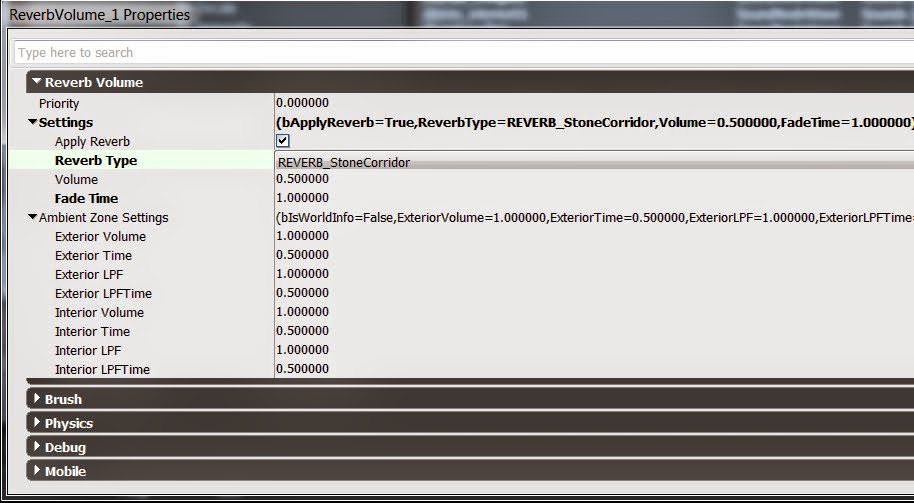
Using knowledge gained from The Game Audio Tutorial book I began to define some basic reverb volumes for the areas within the level. These volumes were created by using the builder brush to highlight areas of the game map and then define them as a reverb volume (area in which a reverb is applied when the player enters). Once the reverb volumes were created setting were available for adjustment such as reverb type (related to the type of space desired), volume of the reverb and fade time (time taken to fade in or out when the player enters or leaves the reverb volume). In cases where two or more volumes overlap a priority setting can be defined, this will make one volume take priority over another in such a situation.These settings were adjusted enough to sound authentic as possible given the limited number of preset reverb sounds available. This will provide a base to build upon and develop further but at this point gives an idea of how my own sounds will play back within the games environment.

Defining Reverb Volumes (highlighted in yellow)

Reverb Volume settings


Friday, 23 January 2015

Dungeon Level editing - Footsteps 01

Footsteps are arguably the most repetitive sound a player will hear in most first person games. Keeping them interesting and fresh whilst also varied is a tough challenge for a sound designer with very little memory allocation. If executed poorly the player may become distracted from actually playing and enjoying the game and thus breaking immersion. Even the prettiest graphics can't detract from annoying footstep sounds.

First step forward  

Footsteps within UDK are played back by detecting the foot collisions of the player whilst they move around. These collisions can only take place when an item in the game such as a static mesh reference a 'physical material' such as 'stone' or 'gravel' for example. In order to playback custom footstep sounds I firstly had to create a new physical material within UDK, this material could then be referenced by the floor mesh within the level. 
Physical material creation for a wooden floor

Once the floor mesh was referencing my new physical material (done using the material editor) then it could call the custom footstep sound cue associated with that physical material.

The footstep sound associated with the physical material had to be coded within the unrealscript by defining the new material and the path to the relevant sound cue.


Using some of the footstep recordings that were added to the assets I created the sound cue which was set to play back the footstep sound when walking on the wooden floor material around the level. This included breaking the step sounds up into heel and toe sections which were then married together using the concatenator node within the sound cue editor. Two random nodes were used to play back of heel and toe sounds as well as adding modulation nodes to both sets of sounds. This resulted in a great deal of variation in the footstep sounds being played back.


This was enhanced further by adding in some creaking floorboard sound effects which were also randomised and modulated.
This resulted in a much less repetitive footstep system, however at present, the pace at which the steps are played back are too fast for how I want the player to move. It sound more link a jogging speed and a walk is more desirable. There are no settings within the kismet that I have managed to find which can define the footstep playback frequency so this may be a coding problem to solve. The next task will be to resolve this issue before anymore footsteps are created.

Wednesday, 14 January 2015

Recording Session - Binaural Breathing

To enable a more intimate connection between the player and character, a breathing system is planned for the character which will change dynamically as the player navigates through the level.

Instead of traditionally recording breathing sounds directly into a microphone set up the decision has been made to use a set of in ear binaural microphones. this will capture the the sound of breathing from a perspective which is much more realistic and hopefully make the player tune into the mood of the character, leading to a greater sense of immersion.

The recordings were chopped up into inhale and exhale samples which will be imported into UDK and joined together randomly to create a varying breath sound.

[UPDATED] 25/04/15
I have eventually got round to uploading a sample of what was recorded.